

Feedback is less actionable when decisions are scattered across emails, chat threads, spreadsheets, and video calls.
It's a simple pattern we have seen across productions at CGWire: an artist receives a note in a messaging app, answers a different question in an email, and uploads a new version to a shared drive. The impact isn't negligible: the production team spends time reconstructing which comment applies to which file, and these tiny delays compound.
Online video review and approval provides the record you need to turn feedback into achievable action steps: it gives a studio a centralized workflow for uploading work in progress, collecting visual feedback, tracking revisions, and recording approval decisions. Every note remains connected to its production context.
Review participants also extend beyond the studio. Remote vendors and clients can all contribute to the same decision, but all participants still need enough context to understand the work without receiving unrestricted control.
For all these reasons, the right online review and approval process accelerates decisions and creates a reliable production record while allowing artists to remain focused on production.
"Communication with remote studios have been simplified. We can discuss a specific asset or task without exchanging 10 emails. If we have any doubts, we can rely on the data."
Tristan Mercier, Production Director at Tant Mieux Prod
What an Effective Online Video Review and Approval Workflow Looks Like
An artist uploads a preview version whose name, task, shot, and production status match the studio's conventions. The supervisor can immediately understand what changed and whether the preview is ready for review.
A supervisor provides the next validation layer to protects expensive review time from being spent on an incomplete or incorrectly published version. They confirm that the correct file is uploaded, the preview plays properly, and known technical issues are documented.
Reviewers then need to watch the same preview under the same production context. A synchronized review removes the version ambiguity that appears when files circulate independently through email or chat.
Frame-specific notes make that shared reference actionable. A reviewer attaches a comment to the start of a problematic action, identifies the affected range, and draws the intended correction directly over the frame. The animator receives the issue, its location, and the expected outcome in one place.
At CGWire, we built collaborative playlists in Kitsu for this. Participants can open the same playlist, review the same media, and draw during the discussion. The shared visual context helps a remote review retain the precision of a conversation around the same screen.
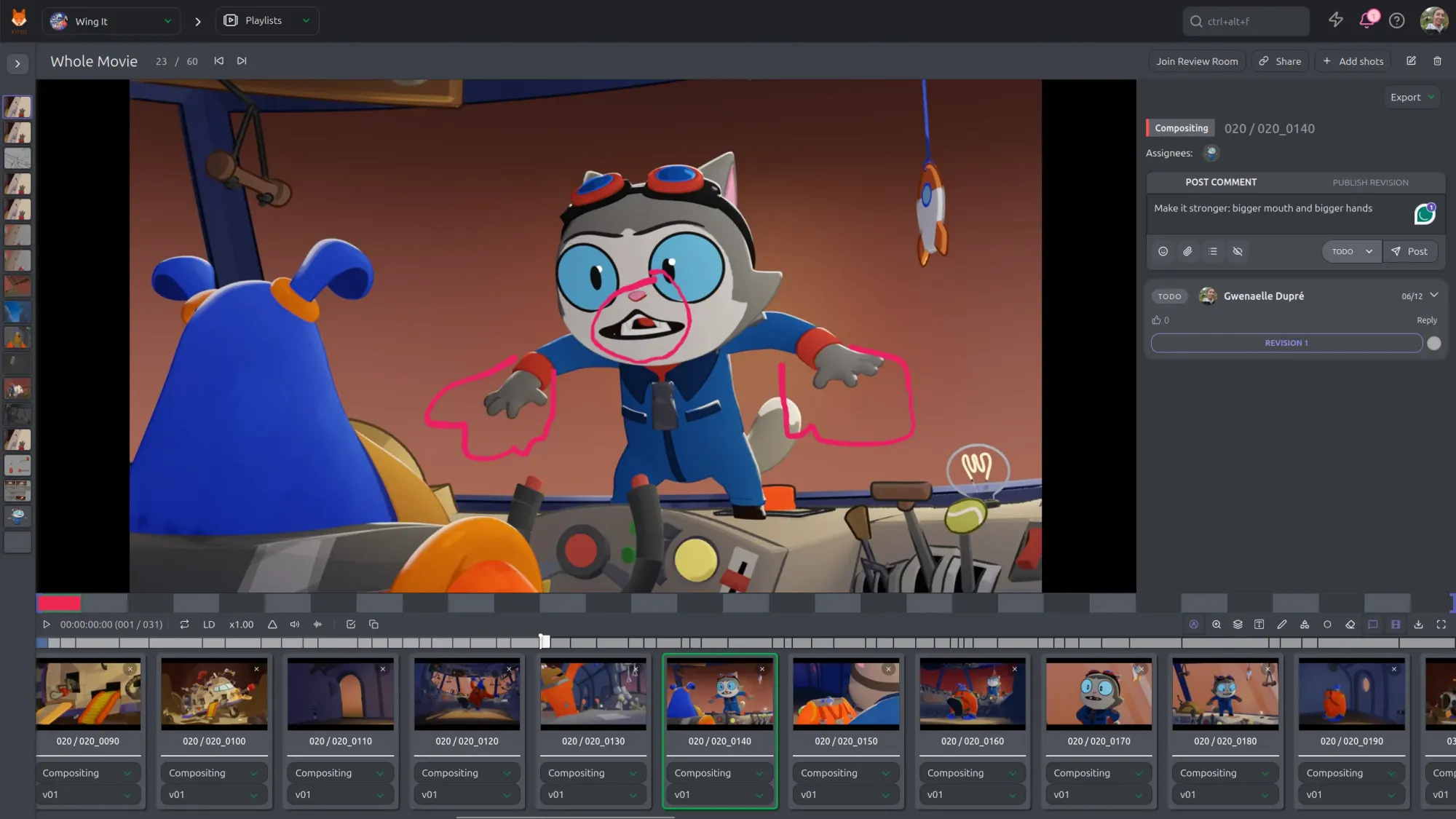
Chris Unterberg from Tetsuo Animation described the practical value of this approach:
"You can have a meeting with multiple Kitsu users that are all on the same playlist and they can all draw on the same thing. That means you can talk about very specific things at a very specific time."
Collaborative review still requires one person to consolidate the outcome. For example, a director or supervisor can resolve conflicting comments and return a coherent set of notes to the artist to give a clear decision.
Each submission also benefits from an explicit task status. A version marked as changes requested, approved with notes, or final communicates a different consequence. The supervisor can route the shot correctly because the approval state does not depend on interpreting the tone of a comment.
Once approved, the work moves down the pipeline to the next department while its review history remains accessible. All tasks need traceability: a lighting artist can see why the animation changed, or a compositor can understand why an approved shot was later reopened. This trace turns reviews into reusable production know-how to make the next iterative loop more efficient.
Having a tool like Kitsu or OpenRV is key to streamline the process and leave less room for errors.
Key Features in a Review and Approval Platform
Frame-accurate comments and drawing tools are the most important ones. A note tied to a precise frame identifies when an issue starts. An on-screen annotation clarifies position, direction, scale, or composition. Together, they reduce the possibilities of interpretation errors.
The platform also needs to support the media formats used throughout production. Concept art and model sheets can arrive as still images, layout and animation can rely on playblasts, editorial needs animatics, and lighting provides rendered video.
Clear version history protects the team from reviewing outdated work. A supervisor comparing two versions side by side can determine whether a previous note is resolved or whether the correction introduced another issue. Version comparison is visible evidence.
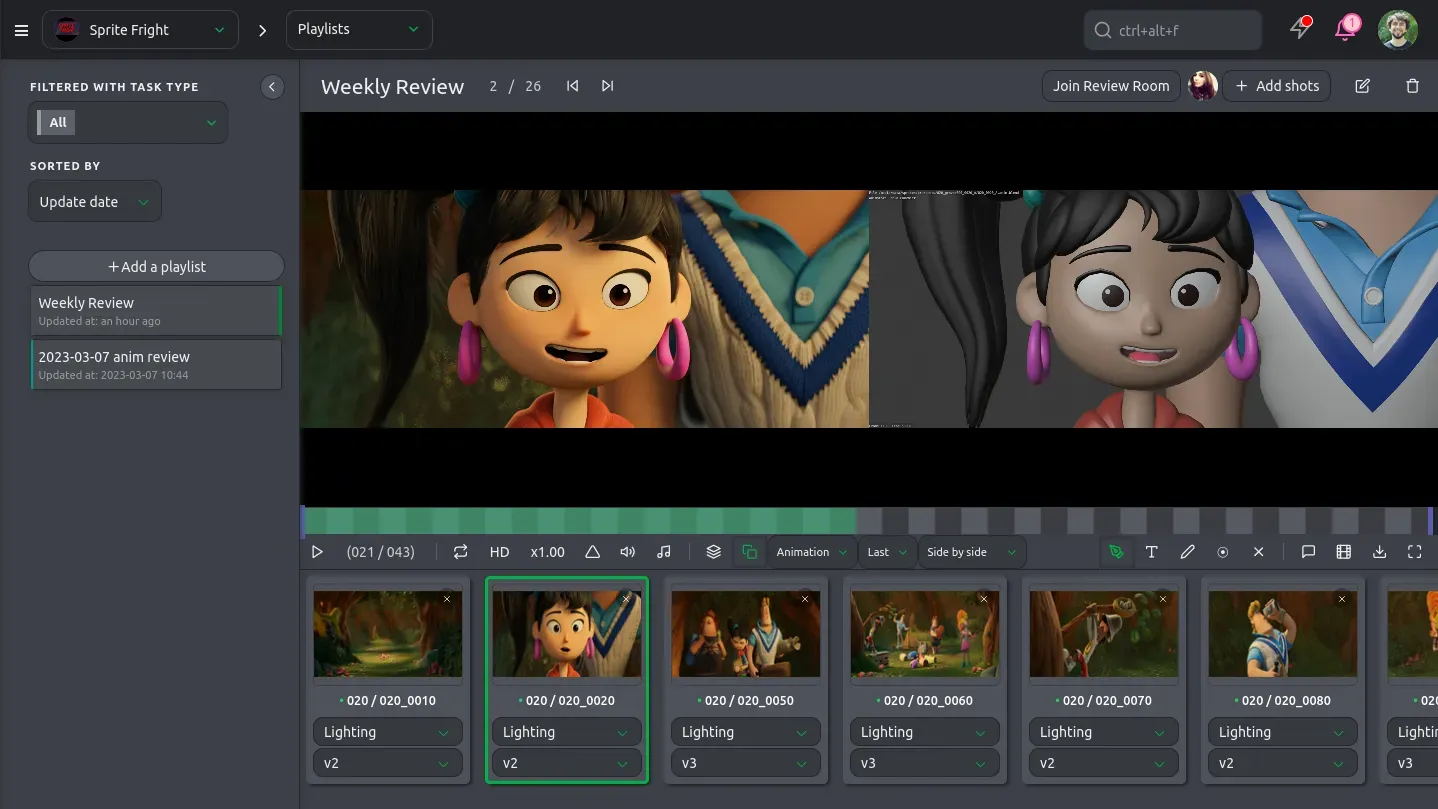
Editable statuses and permissions make decisions operational: an artist can submit work and respond to feedback, a supervisor can request changes, and a director can grant final approval. An accidental task status change is less likely when the system reflects the roles in your studio.
Playlists make it easy to structure different review contexts. For example, a daily animation review could contain every new submission from one department, but a sequence review needs to combine shots from several teams in editorial order. A client presentation could use a curated playlist that excludes internal tests and unfinished material.
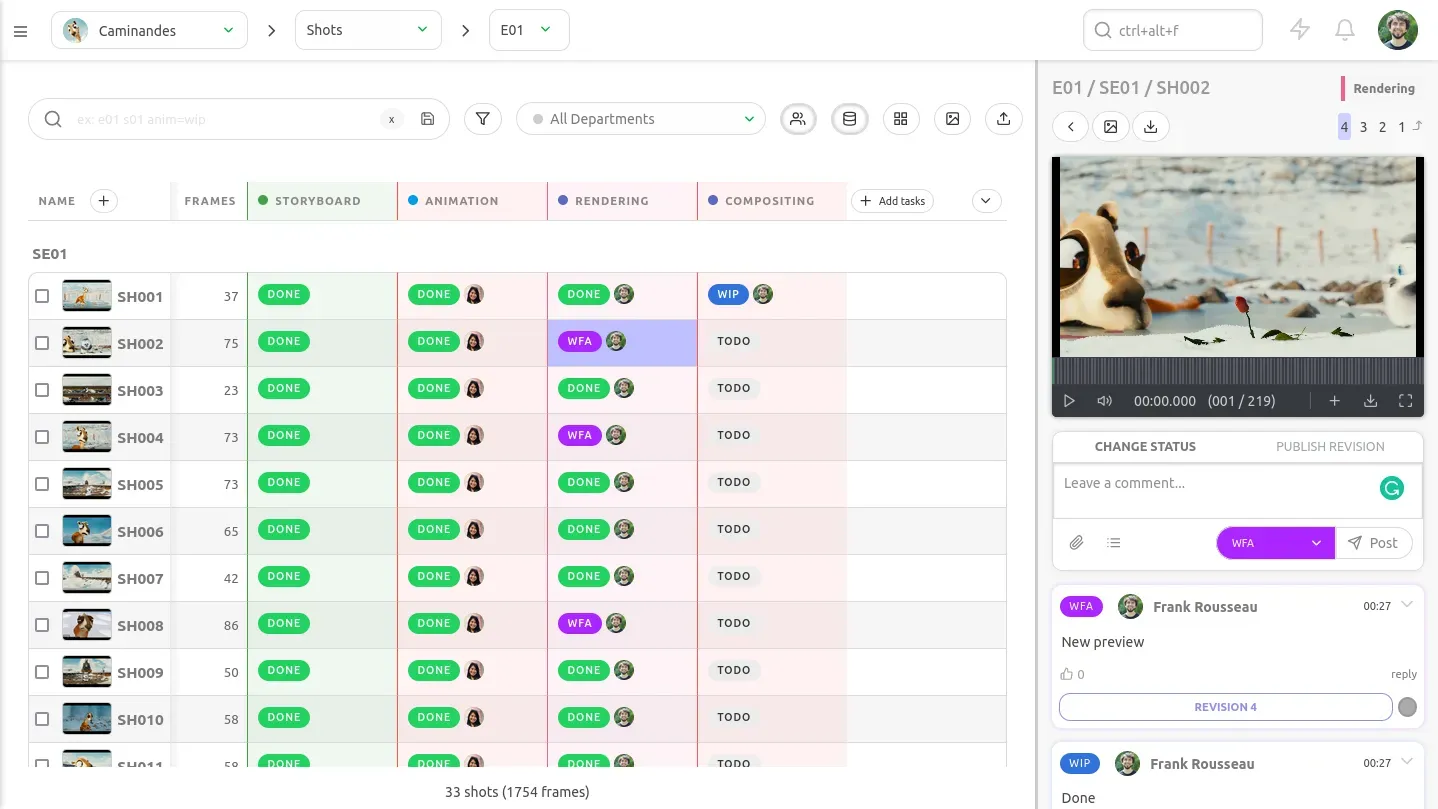
Unlike spreadsheets, databases allow advanced cross-entity filters based on project, episode, sequence, shot, asset, department, task, or assignee to reduce the time spent manually rebuilding review queues and make playlists manageable at scale. A producer needs to find every animation task awaiting review in one episode, but a supervisor just needs work assigned to a specific team.
A searchable record of notes, refusals, and approvals also supports production management. A supervisor can find unresolved feedback without reading meeting transcripts. This history is especially valuable when a team member joins the production after it already began.
Kitsu links previews and comments with any task, whether it's shots or assets. This shared layer prevents teams from maintaining one view for reviews and another view for general production tracking. The reviewed image and the resulting actions remain connected.
Structuring Reviews for Faster and Clearer Decisions
Review stages give each participant a specific role. An artist or peer review can catch obvious issues before supervisor time is used. A department supervisor can validate craft and technical requirements. The director can assess story, performance, and overall creative intent. Technical validation follow when a delivery needs to meet naming, resolution, duration, or pipeline requirements. Client approval can sit at the end when the contract requires an external decision. Each stage answers a different question to prevent every reviewer from evaluating every concern at once.
Authority needs to be as clear as who participates. For example, a reviewer could be allowed to comment without being able to request changes, but a department lead could return work to the artist.
A review is much faster when the team can distinguish mandatory revisions from suggestions and questions. A note about a broken deformation blocks approval, but an alternative acting idea could be optional, to help the artist prioritize the work correctly.
Useful notes identify the issue, its location, and the expected outcome. A comment like "frame 42, the wrist breaks the silhouette, rotate the hand outward so the fingers remain readable" gives the animator enough information to act.
Visual annotations provide additional evidence when words could support several interpretations. A supervisor drawing the desired line of action communicates the intended silhouette immediately. The artist can then focus on execution rather than decoding the note.
Feedback consolidation protects artists from contradictory direction. If several people identify valid concerns from different perspectives during a review, a supervisor or director should reconcile those concerns into one set of priorities before the task returns to production.
Deadlines and escalation rules keep shots from waiting indefinitely, with a review window for standard work and a shorter window for critical-path shots. When the window expires, the supervisor knows who can provide a decision or escalate the delay.
Late notes need visible history because previously approved work may already have moved downstream. Approval does not guarantee that every issue has disappeared, especially when a later department reveals a problem. A visible review history allows the studio to manage those exceptions without losing accountability.
"Kitsu makes cross-department communication quick and easy. Even just small edits, things that slipped through because the shots had already been approved."
Audrey Tondre, Production Director at Remembers
Balancing Collaboration With Access Control
Animation review benefits from broad expertise and narrow decision authority. Artists, supervisors, directors, producers, and clients can each identify valuable issues, but the process only remains manageable when a limited number of people can request changes or grant approval.
This distinction between stakeholders reduces feedback overload. An artist can receive observations from several specialists while knowing which consolidated notes require action. The creative conversation stays open, but the production decision is clear.
Differentiating internal and client-facing review contexts also protect that balance. An internal playlist contains technical tests, candid discussion, and early work, while a client playlist includes selected versions ready for external evaluation.
Role-based access protects confidential assets and production information. A vendor needs access to a single sequence. A client needs access to approved presentation material. Restricting visibility by project, team, playlist, or task reduces unnecessary exposure.
Control supports collaboration when everyone understands how a discussion becomes a decision.
Implementing a New Review and Approval Process
A successful implementation begins with evidence from the current workflow: a studio can examine recent shots that accumulated duplicate notes, lost approvals, or long review delays. These cases reveal where information leaves the production record and where the new process needs to provide structure.
The studio can then map review stages, participants, handoffs, and status definitions. A typical map shows who submits a version, who verifies it, who reviews it, who approves it, and which department receives it next. This shared model exposes duplicated steps and unclear authority before software configuration begins.
A pilot on one sequence, episode, or small production lowers adoption risk. The team can test naming conventions, permissions, and review stages under real conditions. Evidence from the pilot gives the studio a stronger basis for adjusting the workflow.
Short templates improve consistency without creating heavy administration: a version name could include the shot, task, and revision number, while a feedback template could capture the issue, frame, and expected result. These conventions help new participants understand the workflow quickly.
Training works best when it reflects real production scenarios. An artist should practice submitting a work-in-progress animation, and a supervisor can annotate a timing issue.
Workflow owners provide continuity during adoption. A production manager, pipeline lead, or experienced supervisor can answer questions about permissions, statuses, and exceptions. Again, clear ownership prevents each department from creating its own interpretation of the process.
Feedback from the pilot can reveal unnecessary steps, like a task status that nobody uses. Remove that friction to make studio-wide adoption easier.
Measuring the Impact
Review performance becomes easier to improve when the studio measures decision flow:
- The average time from submission to first feedback shows how long artists wait before receiving direction.
- The time from first review to final approval reveals how efficiently notes are resolved.
- A high count of revision rounds per shot reflects genuinely difficult work or a broken process.
- The percentage of notes tied to exact frames can indicate feedback quality.
- Shots reopened after approval can reveal incomplete validation or undocumented conditions.
- Conflicting and duplicate notes show whether decision ownership is working.
- Reviewer participation and on-time response rates reveal where approvals stall.
- A reduction in approval-related email and meetings can show whether the centralized workflow is replacing fragmented communication.
No matter which KPI you choose, a process that looks efficient in reports still needs to help people spend more time producing useful work.
Conclusion
Scattered feedback costs a studio time it can't get back. Structured review gets that time back.
Video review and approval is an important part of the production pipeline: every comment, annotation, version, and approval influences the next department. Connecting those decisions to production tracking gives the studio a dependable operational record.
A studio that solves review and approval has removed one bottleneck, but production tracking as a whole raises the same question: how many other decisions in the pipeline are still living in someone's spreadsheet instead of a global production record? Make sure to read our blog to find out!