
As a studio grows, the cracks in a manual pipeline get louder: an artist publishes an asset, a supervisor approves a shot, a task flips to Done, but somewhere down the line, another tool is still waiting to be told. Those delays add up.
Kitsu's Event API changes the game by broadcasting what's happening in production the moment it happens. No polling, no guesswork. Just real-time signals you can act upon.
With webhooks, you can trigger automated actions the instant production data changes, like launching renders, syncing tracking tools, notifying teams, or updating downstream systems without human hand-offs.
In this article, we'll break down how to set them up and put them to work, with a practical, studio-tested example you can drop into a real pipeline.
You can find the complete source code for the example integration showcased in this guide on our GitHub:
🔗 https://github.com/cgwire/blog-tutorials/tree/main/kitsu-webhooks%20
Why Webhooks
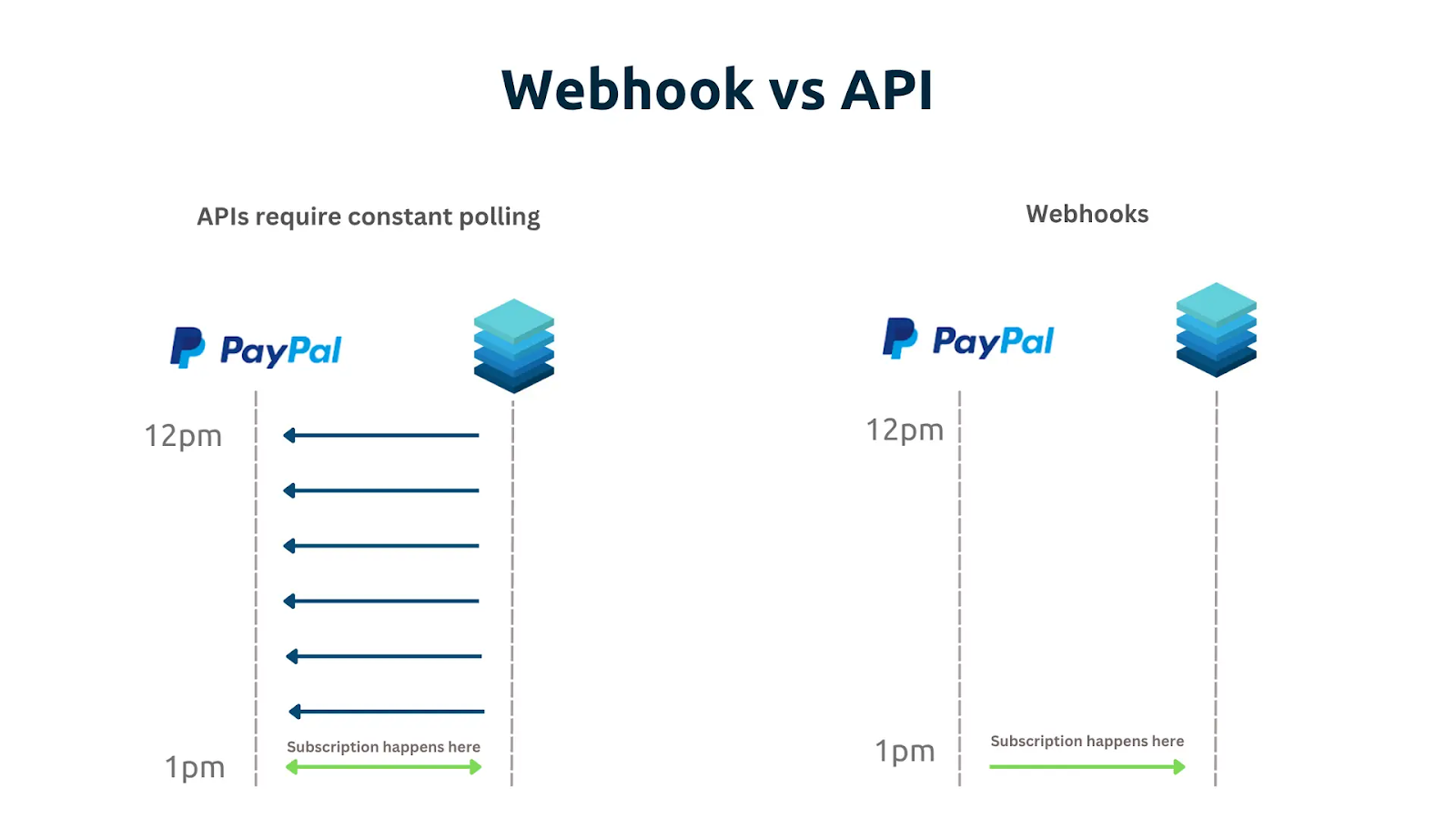
Polling the API every few minutes is like asking production for updates by shouting across the floor: it's slow, noisy, and easy to miss at the exact moment something matters.
Webhooks flip that model: instead of checking whether Kitsu changed, Kitsu tells your pipeline immediately when it does.
This brings several production benefits in practice: a modeler creates a new prop in Kitsu, and within seconds, your asset build system spins up the correct directory structure on the server, registers the asset in your DCC tools, and makes it visible to layout. No artist has to copy a name or click a button.
Later in the schedule, a lighting task moves to Done. That single status change can trigger your render management system to submit the shot automatically, using the latest approved files and the correct render settings for the show. By the time anyone notices the task is finished, frames are already rendering.
When an artist publishes a file, the webhook can push that version straight into your review stack. The media is transcoded, uploaded, and attached to the correct shot before the supervisor opens their inbox. Reviews happen sooner, notes come back faster, and work keeps flowing instead of waiting for someone to remember the next step.
This is what webhooks buy you: production data turning directly into action. Fewer hand-offs, tighter feedback loops, and a pipeline that reacts at the same speed your artists work.
Available events
Kitsu emits events for all production actions covered by available data models:
- Asset creation and updates
- Shot creation and updates
- Task status changes
- Preview file creation and publication
- People management
- Organization changes
- Shot and sequence updates
Each event carries structured data (IDs, timestamps, user information) so you can precisely identify what changed and react accordingly: a real-time production log you can subscribe to!
1. Create an event listener
The first step is to register an event listener using the Kitsu Python client (gazu). This listener acts like a webhook endpoint: it waits for events and calls your callback function when they occur.
import gazu

gazu.set_host("http://localhost/api")
gazu.set_event_host("http://localhost/api")
user = gazu.log_in("admin@example.com", "mysecretpassword")

def my_callback(data):
    print("Asset created %s" % data["asset_id"])

event_client = gazu.events.init()
gazu.events.add_listener(event_client, "asset:new", my_callback)
gazu.events.run_client(event_client)
First, we import Gazu, the official Python client for Kitsu, and configure it to talk to a Kitsu server running locally. Both set_host and set_event_host point to the same API URL: the first is used for standard REST calls, while the second is specifically for the event (websocket) endpoint. In production, it's recommended to set up the two in different threads because listening to events is blocking. But for the sake of simplicity, we do it all in one endpoint in this tutorial.
Next, we authenticate as a user. Calling gazu.log_in logs in with the provided credentials and establishes a session so the client is authorized to receive events from Kitsu.
The my_callback function defines how your pipeline reacts when an event is received. It takes the event payload as input and, in this case, simply prints the ID of the newly created asset. In a mid-size animation studio, this callback could, for example, trigger a script that creates a standardized directory structure on the file server whenever a new asset is added in Kitsu. Artists no longer need to set this up manually, and naming conventions stay consistent.
After that, the script initializes an event client with gazu.events.init(). This client maintains a persistent connection to Kitsu's event system.
The call to gazu.events.add_listener registers the callback function for a specific event type: "asset:new". This tells Gazu, "Whenever Kitsu emits an event indicating that a new asset was created, call my_callback with the event data."
Finally, gazu.events.run_client(event_client) starts the event loop. From this point on, the script blocks and listens continuously via a WebSocket connection. As soon as someone creates an asset in Kitsu, Kitsu emits an asset:new event, Gazu receives it, and my_callback is executed immediately.
2. Send test events
To validate your setup, you need to generate real events. The easiest way is to perform standard API actions that you already use in production. For example, by creating an asset programmatically:
import gazu

gazu.set_host("http://localhost/api")
user = gazu.log_in("admin@example.com", "mysecretpassword")

projects = gazu.project.all_projects()
project = projects[0]

asset_types = gazu.asset.all_asset_types()
asset_type = asset_types[0]

asset = gazu.asset.new_asset(
    project,
    asset_type,
    "My new asset",
    "My asset description"
)
After authentication, we retrieve the list of all projects visible to the logged-in user by calling gazu.project.all_projects(). From that list, we select the first project. In a real production tool, you'd usually look up a specific project by name or ID, but this keeps the example simple.
The same pattern is used for asset types. The script queries all available asset types, then picks the first one. Asset types define what kind of asset is being created (character, prop, environment, and so on), and Kitsu requires one to be specified when creating a new asset.
With a project and an asset type in hand, we create a new asset by calling gazu.asset.new_asset. The function takes the target project, the asset type, a name, and a description. When this call succeeds, Kitsu immediately creates the asset in its database and returns the newly created asset object.
At this point, the asset exists in Kitsu exactly as if it had been created through the web interface. This action also emits an asset:new event, allowing the rest of your pipeline to react automatically.
Before rolling this out studio-wide, a pipeline TD can create assets in a staging project to confirm that the event triggers downstream automation without touching real production data.
3. React to events with callbacks
Callbacks are the point where Kitsu events turn into concrete pipeline actions. When a callback is executed, it receives a payload describing exactly what changed: an asset was created, a task moved to a new status, or a file was published. That payload becomes your entry point for driving automation.
A common first step inside a callback is to use the IDs in the event data to pull full context from Kitsu. For example, when you receive a task update event, you can fetch the complete task, the linked shot, and the associated project to understand where in the show this change happened and what rules should apply.
From there, callbacks typically perform side effects that would otherwise require manual intervention. An asset creation event could, for example, result in a standardized folder tree being created on disk. A file publish event can push media into your review system, attach metadata, and make it visible to supervisors immediately.
The key idea is that callbacks let production state drive behavior. Instead of people reacting to updates, your pipeline does, consistently and instantly, using the same rules every time.
Fork our example Github repository to try it out for yourself.
4. Search events
Live events are only half the story. Kitsu also keeps a record of past events, which gives you a reliable paper trail of what actually happened in production. When something goes wrong or when you need to prove that something worked, this event history is an essential debugging tool.
Through the API, you can query recent events and filter them by time range or event type. Pulling the last hundred events is often enough to get immediate context after a failure. Narrowing the query to a specific date range lets you inspect what happened during a particular shift or overnight run. Filtering to file-related events is especially useful when tracking publishes and media ingestion issues.
events = gazu.client.get("data/events/last?page_size=100")
events = gazu.client.get("data/events/last?page_size=100&before=2019-02-01")
events = gazu.client.get("data/events/last?page_size=100&before=2019-02-01&after=2019-01-01")
events = gazu.client.get("data/events/last?page_size=100&only_files=true")
In practice, this is how you reconstruct a broken automation. Imagine a publishing script fails sometime during the night, and the morning team finds missing media in the review system. Instead of asking artists when they published or digging through logs across multiple machines, you can query Kitsu for all file events from the previous day. That gives you an exact sequence of publishes, timestamps, users, and linked entities.
You can also keep track of specific events in your pipeline for productivity reports. For example, you could compile the activity log of your animation team to know who did what.
Conclusion
Kitsu API events give you a clean, reliable way to build reactive pipelines. By listening to production changes instead of polling for them, you reduce latency, eliminate manual steps, and make your studio more resilient as it scales.
Of course, webhooks only go as far as your knowledge of Kitsu scripting, so make sure to have a look at more technical tutorials from our blog to get a better idea of what you can build!