

If spinning up a new show or scene in Kitsu means clicking through forms, recreating asset lists, and assigning artists one at a time, your onboarding is lacking.
That manual overhead compounds fast. Every new production repeats the same setup ritual, every crew onboarding becomes a copy-paste marathon, and every step adds another chance for something to break. At studio scale, that friction costs real time, real money, and real sanity.
The fastest studios don't just use Kitsu: they wire it in their pipeline. They treat it like a production database, feeding it clean, structured studio data so new shows, shots, or departments come online in minutes, not days. Pipelines are cloned, teams are attached automatically, and Kitsu becomes an engine instead of a bottleneck.
In this article, we'll break down a practical, production-tested workflow for doing exactly that, using CSV files and the Kitsu Python API (Gazu) to automate production onboarding and make setup work disappear.
You can find the complete source code for the example integration showcased in this guide on our GitHub:
🔗 https://github.com/cgwire/blog-tutorials/tree/main/import-spreadsheet-to-kitsu
What You Can Import
In a real production, almost all of the data falls into a few repeatable buckets that are perfect for automation:
- Artists - Your crew already exists somewhere else: an HR sheet, a payroll export, a Notion table. That data usually includes names, emails, and roles like Animator, TD, or Supervisor. Instead of recreating users by hand in Kitsu, you can import that list in one pass and have your team ready to go before day one.
- Assets - Characters, props, environments ... anything that follows a naming convention is easy to automate. A CSV with entries like
CHAR_RobotA,PROP_Sword_01, orENV_CityBlockcan become a fully populated asset list in Kitsu in seconds, organized exactly the way your pipeline expects. - Tasks - Tasks are also where manual setup really hurts. Modeling, Rigging, Surfacing, Animation... these task types rarely change from show to show. By importing tasks in bulk, you can automatically attach the right task stack to every asset and even pre-assign artists or departments, instead of clicking through hundreds of rows in the UI.
Beyond the basics, you can import any production-shaped data Kitsu understands: sequences, shots, episodes, or even entire productions. This makes it trivial to duplicate a previous show's structure or spin up a new season with the same layout and naming rules.
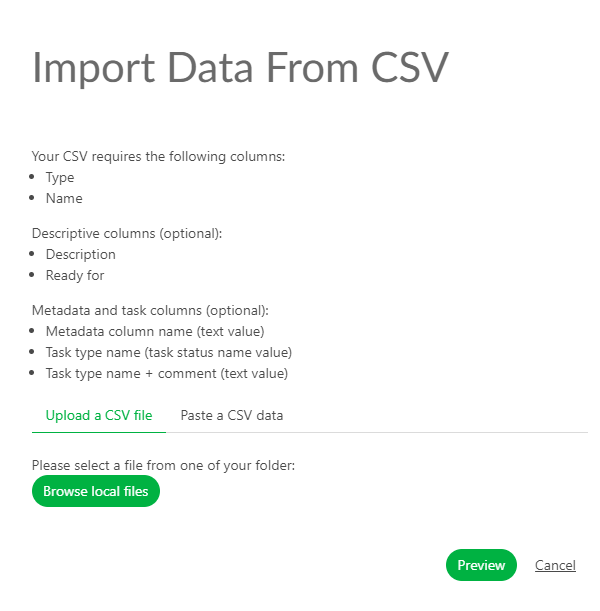
Most studios already store all of this in spreadsheets. Treat those spreadsheets as data sources, feed them directly into Kitsu, and let automation do the setup work.
While Kitsu's UI supports basic spreadsheet imports, scripting takes it much further: with the Kitsu Python API (Gazu), you can chain automations like syncing tasks from Notion, mirror your asset tracker, or regenerate task lists whenever the schedule changes.
1. CSV Parser
The first step is to standardize how you read studio data. CSV is ideal: it is easy for production to edit and easy for scripts to parse.
In this tutorial, we'll focus on the artist data model for the sake of simplicity, but we could do something similar with assets stored in Google Drive or tasks in Trello.
def load_csv(file_path: Path) -> pd.DataFrame:
    """Load a CSV file into a pandas DataFrame."""
    return pd.read_csv(file_path)


def parse_artists(df: pd.DataFrame) -> List[Dict]:
    """
    Expected columns:
        - email
        - first_name
        - last_name
        - role
    """
    return df.to_dict(orient="records")
load_csv is the entry point that turns a raw CSV file into something Python can work with. It reads the file from disk using pandas and returns a DataFrame, giving you a structured, table-like representation of the spreadsheet that can be filtered, validated, or transformed before anything is sent to Kitsu.
parse_artists takes a DataFrame that represents artist data and converts each row into a dictionary containing an artist's email, name, and role. By returning a list of these dictionaries, it produces API-ready data that can be passed directly to Kitsu or Gazu to create users in bulk instead of adding artists one by one.
A TV animation studio exporting crew lists from Google Sheets can simply save them as CSV, for example. Production keeps ownership of the data, while TDs automate ingestion without asking for format changes every show.
2. Kitsu Auth
Before uploading anything, you need to authenticate against your Kitsu instance:
gazu.set_host("http://localhost/api")
user = gazu.log_in("admin@example.com", "mysecretpassword")
In practice, studios often use a dedicated pipeline or admin account for automation. This avoids permission issues and keeps audit logs clean when scripts create or modify data.
For local testing, it's advised to use the kitsu-docker install.
3. Loading Data
Artists are usually the first bottleneck during onboarding. You need to gather emails, send invites, assign them to tasks... automating their creation removes hours of manual work for production coordinators.
def upload_artists(artists: List[Dict]):
    """
    Create artists if they do not already exist.
    """
    existing_users = {
        user["email"]: user
        for user in gazu.person.all_persons()
    }

    for artist in artists:
        if artist["email"] in existing_users:
            print(f"Artist exists: {artist['email']}")
            continue

        gazu.person.new_person(
            artist["first_name"],
            artist["last_name"],
            artist["email"],
        )
        print(f"Created artist: {artist['email']}")
This function takes a list of artist dictionaries and syncs them into Kitsu while avoiding duplicates.
It starts by querying Kitsu for all existing users and building a lookup table keyed by email, which makes it fast to check whether an artist already exists.
It then iterates over the incoming artist data and, for each entry, compares the email against that lookup: if a match is found, the script skips creation and logs that the artist already exists. If no match is found, it creates a new user in Kitsu using the artist's name and email via the Gazu API, then prints a confirmation.
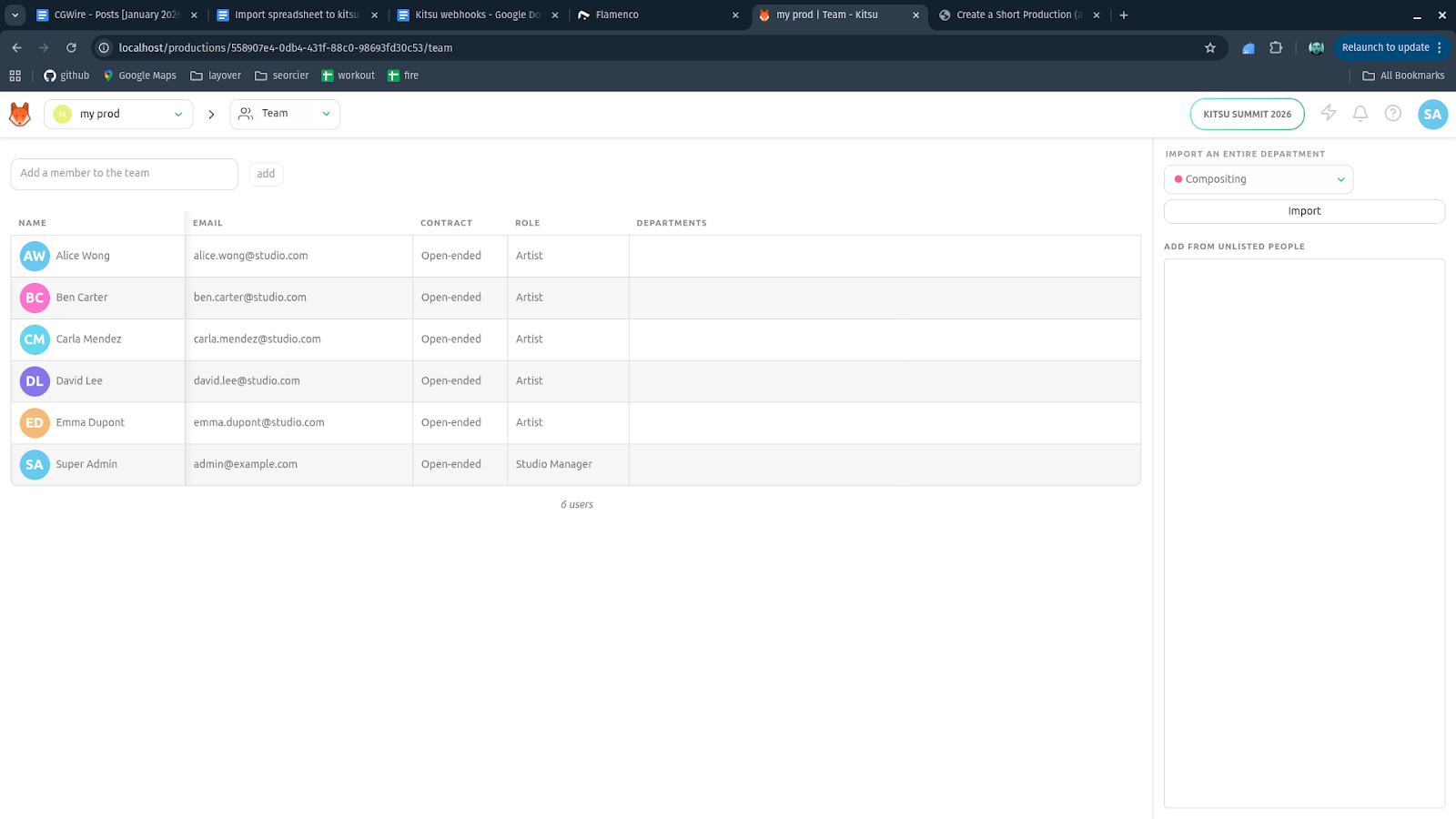
The result is an idempotent import step you can safely re-run—new artists are added, existing ones are left untouched.
On a feature film ramp-up, a studio could import hundreds of artists from HR data in under a minute. Late hires could be added by simply updating the CSV and rerunning the script without duplicating users or manual checks.
4. Tying It All Together
The main entry point ties everything together:
if __name__ == "__main__":
    gazu.set_host("http://localhost/api")
    user = gazu.log_in("admin@example.com", "mysecretpassword")

    artists_df = load_csv(Path("artists.csv"))

    artists = parse_artists(artists_df)

    upload_artists(artists)
This block only runs when the file is executed directly, not when it's imported by another module.
After authentication, it loads the artists.csv file into a pandas DataFrame, converts those rows into a list of artist dictionaries using parse_artists, and retrieves an existing production in Kitsu by name.
Finally, it calls upload_artists, which is responsible for iterating over that prepared data and creating the artist accounts in Kitsu, completing the automated onboarding step without any manual UI work.
In practice, studios version these scripts alongside their pipeline tools. A new show becomes a repeatable command, not a checklist.
Now, you can log back into your Kitsu dashboard and see the final result:
Have a look at our corresponding Github repository for a working example you can easily fork to fit your needs!
Conclusion
At its best, Kitsu automation allows technical directors to reclaim control over how productions are born. When your pipeline can create itself from clean data, onboarding stops being a chore. By importing artists, assets, and tasks directly into Kitsu, you eliminate redundant work, reduce human error, and make production onboarding predictable. This approach scales from small teams to multi-show studios.
Here are some additional features you could add to make your import pipeline more interesting:
- automatically assign tasks to artists based on their role
- populate departments for production tracking
- generate starting estimates and individual department calendars based on budget constraints
- turn a script into a breakdown list for each shot and use it to pre-generate assets
The list can go on, but you just have to start small!